
2FA REST API
When to choose 2FA REST API
Choose 2FA REST API when your application needs to create one-time SMS challenges and validate user-entered codes without building token generation, delivery, and expiry handling yourself; choose the SMS APIs when you only need to send standard notifications.
Overview
This page describes the resources that make up the 2FA REST API v1, for developers who want to integrate Two Factor Authentication into their application.
The 2FA REST API provides access to resources (data entities) via URI paths. To use a REST API, your application will make an HTTP request and parse the response. The response format is JSON. Your method will be the standard HTTP method POST.
What the API can do
- Create a 2FA challenge for a mobile handset
- Send the challenge by SMS using a generated code
- Customise the challenge message when it includes the
%(code)svariable - Set an optional alphanumeric mask where supported
- Adjust the validity window for a challenge code
- Validate a user’s response against the original challenge
How it works
In practice, the API follows a simple workflow:
- Authenticate with HTTP Basic Authentication.
- Create a challenge with
POST /challenges. - Send the returned challenge ID to your application session or verification flow.
- Ask the user to enter the code they received.
- Validate the code with
POST /responses.
When to use 2FA REST API
Use 2FA REST API when you need a hosted SMS challenge-and-response flow for login verification, transaction approval, or other step-up authentication journeys.
For ordinary one-way SMS notifications, use REST v2 or another SMS API instead. For multi-channel fallback, review IM API.
Before you start
Before making your first request, confirm the following:
- Your 2FA application has been provisioned.
- You have the application username and password for HTTP Basic Authentication.
- Mobile numbers are formatted in international format, for example
+64211234567. - Any custom message content includes the
%(code)snamed variable. - Any requested mask is supported for the destination country and carrier.
First successful request path
For most implementations, the fastest way to validate connectivity and configuration is:
- Authenticate using your 2FA API username and password.
- Submit a minimal
POST /challengesrequest with a valid destination. - Store the returned challenge ID.
- Submit a
POST /responsesrequest with that challenge ID and the code received by the handset. - Confirm the response status and handle failed or expired codes in your application.
Authentication
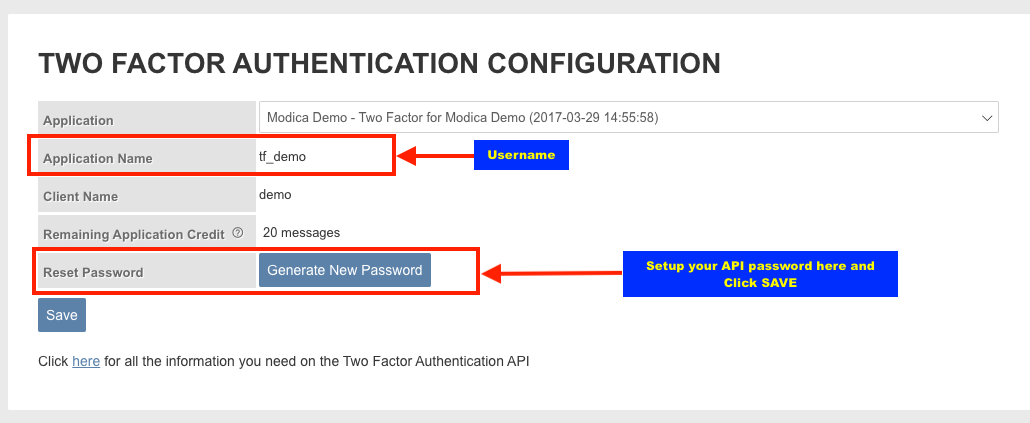
HTTP Basic Authentication is used for all requests. If you access the API without having the correct credentials OR permission to access the API, you will get a HTTP 401 response.
We will provide you with a username and password to use. Your application username is the same as your application name on this page. If you don’t have these details, please contact support@modicagroup.com.
Base URI
All API access is over HTTPS, and accessed from: https://api.modicagroup.com/rest/2fa
Versions
The REST API version is currently v1. A custom media type is used to let consumers choose the data format they wish to receive:
Accept: application/vnd.modica.2fa.v1+json
Creating a Challenge
To send a challenge to a mobile handset, submit a POST request:
POST /challenges

{
  "destination": str:mobile-number
}
Create Challenge Example
These examples create a 2FA challenge using the 2FA REST API.
curl -X POST "https://{apiDomainName}/rest/2fa/challenges" \
  -H "Accept: application/vnd.modica.2fa.v1+json" \
  -H "Content-Type: application/json" \
  -u "username:password" \
  -d '{"destination":"+64211234567"}'
const credentials = btoa("username:password");
const response = await fetch("https://{apiDomainName}/rest/2fa/challenges", {
method: "POST",
headers: {
"Accept": "application/vnd.modica.2fa.v1+json",
"Authorization": `Basic ${credentials}`,
"Content-Type": "application/json"
},
body: JSON.stringify({
destination: "+64211234567"
})
});
const challenge = await response.json();import requests
response = requests.post(
"https://{apiDomainName}/rest/2fa/challenges",
auth=("username", "password"),
headers={
"Accept": "application/vnd.modica.2fa.v1+json",
"Content-Type": "application/json",
},
json={
"destination": "+64211234567",
},
)
challenge = response.json()<?php
$payload = json_encode([
"destination" => "+64211234567"
]);
$ch = curl_init("https://{apiDomainName}/rest/2fa/challenges");
curl_setopt($ch, CURLOPT_USERPWD, "username:password");
curl_setopt($ch, CURLOPT_HTTPHEADER, [
"Accept: application/vnd.modica.2fa.v1+json",
"Content-Type: application/json"
]);
curl_setopt($ch, CURLOPT_POST, true);
curl_setopt($ch, CURLOPT_POSTFIELDS, $payload);
curl_setopt($ch, CURLOPT_RETURNTRANSFER, true);
$response = curl_exec($ch);
curl_close($ch);
?>
require "json"
require "net/http"
require "uri"

uri = URI("https://{apiDomainName}/rest/2fa/challenges")
request = Net::HTTP::Post.new(uri)
request.basic_auth("username", "password")
request["Accept"] = "application/vnd.modica.2fa.v1+json"
request["Content-Type"] = "application/json"
request.body = {
  destination: "+64211234567"
}.to_json

response = Net::HTTP.start(uri.hostname, uri.port, use_ssl: true) do |http|
  http.request(request)
end
import java.net.URI;
import java.net.http.HttpClient;
import java.net.http.HttpRequest;
import java.net.http.HttpResponse;
import java.nio.charset.StandardCharsets;
import java.util.Base64;
String token = Base64.getEncoder()
.encodeToString("username:password".getBytes(StandardCharsets.UTF_8));
String payload = """
{
"destination": "+64211234567"
}
""";
HttpRequest request = HttpRequest.newBuilder()
.uri(URI.create("https://{apiDomainName}/rest/2fa/challenges"))
.header("Accept", "application/vnd.modica.2fa.v1+json")
.header("Authorization", "Basic " + token)
.header("Content-Type", "application/json")
.POST(HttpRequest.BodyPublishers.ofString(payload))
.build();
HttpResponse<String> response = HttpClient.newHttpClient()
.send(request, HttpResponse.BodyHandlers.ofString());using System.Net.Http.Headers;
using System.Text;
using var client = new HttpClient();
var token = Convert.ToBase64String(Encoding.UTF8.GetBytes("username:password"));
var request = new HttpRequestMessage(
HttpMethod.Post,
"https://{apiDomainName}/rest/2fa/challenges");
request.Headers.Accept.ParseAdd("application/vnd.modica.2fa.v1+json");
request.Headers.Authorization = new AuthenticationHeaderValue("Basic", token);
request.Content = new StringContent(
"""{"destination":"+64211234567"}""",
Encoding.UTF8,
"application/json");
var response = await client.SendAsync(request);
var responseBody = await response.Content.ReadAsStringAsync();To add a personalised message simply add the optional ‘content’ attribute:
{
  "content": "Your 2FA code is: %(code)s"
}
To mask the source to a custom string, add the optional ‘mask’ attribute:
{
  "mask": "ModGrpExmpl"
}
To modify the validity time for the 2FA code, add the optional ’expiresIn’ attribute:
{
	"expiresIn": "600"
}
On success:
HTTP/1.1 201 Created
X-Modica-Request-Id: uuid:request-id

{
  "created": str:timestamp,
  "expires": str:timestamp,
  "id": uuid:challenge-id
}
On validation error:
HTTP/1.1 400 Bad Request
X-Modica-Request-Id: uuid:request-id

{
  "error": str:error-code
}
Challenge Response
To validate a response to a challenge submit a POST request:
POST /responses

{
  "challenge_id": uuid:challenge-id,
  "code": str:challenge-code
}
Validate Challenge Response Example
These examples validate a user’s response to a 2FA challenge.
curl -X POST "https://{apiDomainName}/rest/2fa/responses" \
  -H "Accept: application/vnd.modica.2fa.v1+json" \
  -H "Content-Type: application/json" \
  -u "username:password" \
  -d '{"challenge_id":"uuid:challenge-id","code":"str:challenge-code"}'
const credentials = btoa("username:password");
const response = await fetch("https://{apiDomainName}/rest/2fa/responses", {
method: "POST",
headers: {
"Accept": "application/vnd.modica.2fa.v1+json",
"Authorization": `Basic ${credentials}`,
"Content-Type": "application/json"
},
body: JSON.stringify({
challenge_id: "uuid:challenge-id",
code: "str:challenge-code"
})
});
const validation = await response.json();import requests
response = requests.post(
"https://{apiDomainName}/rest/2fa/responses",
auth=("username", "password"),
headers={
"Accept": "application/vnd.modica.2fa.v1+json",
"Content-Type": "application/json",
},
json={
"challenge_id": "uuid:challenge-id",
"code": "str:challenge-code",
},
)
validation = response.json()<?php
$payload = json_encode([
"challenge_id" => "uuid:challenge-id",
"code" => "str:challenge-code"
]);
$ch = curl_init("https://{apiDomainName}/rest/2fa/responses");
curl_setopt($ch, CURLOPT_USERPWD, "username:password");
curl_setopt($ch, CURLOPT_HTTPHEADER, [
"Accept: application/vnd.modica.2fa.v1+json",
"Content-Type: application/json"
]);
curl_setopt($ch, CURLOPT_POST, true);
curl_setopt($ch, CURLOPT_POSTFIELDS, $payload);
curl_setopt($ch, CURLOPT_RETURNTRANSFER, true);
$response = curl_exec($ch);
curl_close($ch);
?>
require "json"
require "net/http"
require "uri"

uri = URI("https://{apiDomainName}/rest/2fa/responses")
request = Net::HTTP::Post.new(uri)
request.basic_auth("username", "password")
request["Accept"] = "application/vnd.modica.2fa.v1+json"
request["Content-Type"] = "application/json"
request.body = {
  challenge_id: "uuid:challenge-id",
  code: "str:challenge-code"
}.to_json

response = Net::HTTP.start(uri.hostname, uri.port, use_ssl: true) do |http|
  http.request(request)
end
import java.net.URI;
import java.net.http.HttpClient;
import java.net.http.HttpRequest;
import java.net.http.HttpResponse;
import java.nio.charset.StandardCharsets;
import java.util.Base64;
String token = Base64.getEncoder()
.encodeToString("username:password".getBytes(StandardCharsets.UTF_8));
String payload = """
{
"challenge_id": "uuid:challenge-id",
"code": "str:challenge-code"
}
""";
HttpRequest request = HttpRequest.newBuilder()
.uri(URI.create("https://{apiDomainName}/rest/2fa/responses"))
.header("Accept", "application/vnd.modica.2fa.v1+json")
.header("Authorization", "Basic " + token)
.header("Content-Type", "application/json")
.POST(HttpRequest.BodyPublishers.ofString(payload))
.build();
HttpResponse<String> response = HttpClient.newHttpClient()
.send(request, HttpResponse.BodyHandlers.ofString());using System.Net.Http.Headers;
using System.Text;
using var client = new HttpClient();
var token = Convert.ToBase64String(Encoding.UTF8.GetBytes("username:password"));
var request = new HttpRequestMessage(
HttpMethod.Post,
"https://{apiDomainName}/rest/2fa/responses");
request.Headers.Accept.ParseAdd("application/vnd.modica.2fa.v1+json");
request.Headers.Authorization = new AuthenticationHeaderValue("Basic", token);
request.Content = new StringContent(
"""{"challenge_id":"uuid:challenge-id","code":"str:challenge-code"}""",
Encoding.UTF8,
"application/json");
var response = await client.SendAsync(request);
var responseBody = await response.Content.ReadAsStringAsync();On success:
HTTP/1.1 201 Created
X-Modica-Request-Id: uuid:request-id

{
  "status": str:status-code
}
On validation error:
HTTP/1.1 400 Bad Request
X-Modica-Request-Id: uuid:request-id

{
  "error": str:error-code
}
Help
Having trouble integrating with any of our services? Contact support@modicagroup.com and we’ll help you sort it out.