
Enabling TLS for plain-text SMPP applications
When to choose SMPP TLS helper
Use this TLS helper when you already have an SMPP client that can only make plain-text SMPP connections, but you still need to connect to iAds Biz over the required TLS-protected SMPP port.
Overview
This page explains how to use stunnel to add TLS support in front of an existing SMPP application.
What this page helps you do
- Keep an existing SMPP 3.3 or 3.4 client application
- Add TLS protection without rewriting the SMPP client
- Connect the client locally over plain-text SMPP
- Forward traffic from stunnel to the iAds Biz SMPP TLS endpoint
- Preserve the same SMPP credentials supplied for your application
How it works
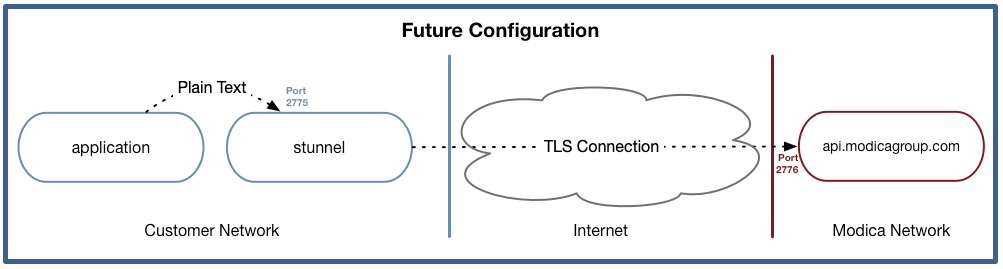
In practice, stunnel sits between your SMPP client and iAds Biz:
- Your SMPP client connects to a local plain-text port.
- stunnel accepts that local connection.
- stunnel opens a TLS connection to the iAds Biz SMPP endpoint.
- SMPP traffic is forwarded through the TLS tunnel.
When to use this helper
Use this helper only when your SMPP client cannot initiate SMPP over TLS itself. If your SMPP client supports TLS 1.2 or higher, connect it directly to the documented SMPP TLS host and port instead.
Before you start
Before configuring stunnel, confirm the following:
- Your SMPP account has been provisioned.
- You have your SMPP system ID and password.
- Your SMPP client can connect to a local host and port.
- stunnel is available for your operating system.
- Your firewall allows outbound connections to
api.modicagroup.com:2776.
First successful connection path
For most implementations, the fastest way to validate the tunnel is:
- Install stunnel.
- Create the configuration shown below.
- Start stunnel and confirm it is listening locally.
- Reconfigure your SMPP client to connect to the local stunnel port.
- Bind with your existing SMPP credentials and submit a test message.
Enabling TLS for plain-text SMPP Applications
You have an SMPP client application, which implements SMPP version 3.3, or 3.4. Unfortunately it does not have support for initiating SMPP over TLS.
This diagram reflects what your application currently supports:
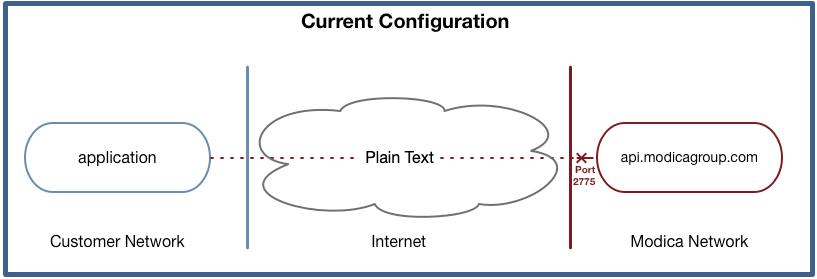
Unfortunately, we cannot support plain-text connectivity over the internet, as this is in breach of our Privacy Policy .
Solution
Utilising stunnel, it is possible to add TLS support to your existing SMPP application, enabling privacy for your customer traffic with a minimum of hassle:
Setup
-
Download and install the stunnel package for your environment from the author’s website: www.stunnel.org
-
Create a config file for stunnel:
[modica_smpp] client = yes accept = 2775 connect = api.modicagroup.com:2776 -
Configure your machine to automatically start stunnel using the configuration file above, and ensure it is set to restart on boot.
-
Re-configure your application to connect to localhost:2775 (or whichever machine you’re running stunnel on in your network). Please keep the same SMPP credentials as we’ve previously supplied you.